Earlier today, Alex Scoble wrote about an IM conversation he and I had regarding VPNs and solving the nagging issue of firewall and other network roadblocks that tend to wreak havoc for people who need to connect to a remote private network. If your VPN client forces you to use some random or uncommon port, you're bound to get frustrated when you try to connect from many business networks, not to mention when you try from the hotel on the road. Now, maybe you shouldn't be plugged into that business network, but blocked by the hotel? Come on, give me a break.
There's no one perfect solution to this problem. There are lots of ideas, though. Many companies (most or all of the big players in the space) are coming out with VPN over SSL options, which is great. But what if you have a need to run a VPN software client, and it doesn't (yet) support SSL tunnels?
Here's one way to skin that cat, a la Cisco: Use TCP 443 in the Cisco VPN client to connect via an IP Sec tunnel to your VPN endpoint. Note that you'll need to specify this in the connection settings. Typically the Cisco client uses the UDP protocol to do it's thing (click to enlarge):
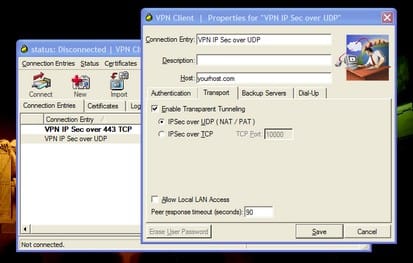
But as you can see, you can also set it up to use the TCP protocol and whatever port(s) your VPN concentrator is configured allow. For example, you could choose to use TCP over port 80, or port 443, since both of those are commonly open from any network. Note that port 80 might be proxied in some cases, but that's probably not a problem with 443, so it's a good one to try (click to enlarge):
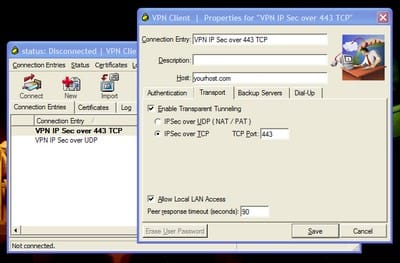
If you set up a couple or few profiles in your VPN client software sufficient to cover the bases (like, say one using UDP and one or two using common TCP ports), you'll pretty much always be able to connect from the road. Again, there's no guarantees and there's no 100% perfect solution, but this gets you better than 95% of the way there, I am confident. Just make sure your VPN host/endpoint is configured to support the ports and protocols you specify. In the past year or two, I have yet to come across a network while traveling (except for a couple of highly-secure ones at business locations, but hey...) that I could not successfully connect through with at least one of the settings I have available to me.
And while we're on the subject, there are some interesting and promising SSL options out there, with more undoubtedly coming. As far as other brands of VPN software clients, well - I've used most of them and let me tell ya, you're better off going with Cisco and looking at the PIX firewalls and the 3000-series VPN concentrators. Trust me, I've dealt with most of them, and there's a reason Cisco's such a prolific Internet company.
But tell me - what do you use and how have you solved this type of problem?

Member discussion: